Airspeed Agents overview
Last updated: July 13, 2026
Note: Agents is one of the newer areas of Airspeed and is evolving quickly. This article gives the high-level map of what Agents are for, where to find them, and which related articles to read next.
What are Airspeed Agents?
Airspeed Agents are AI workflows that can analyze your calls, CRM data, accounts, deals, and connected tools. You can use them for one-off questions, save them as reusable on-demand agents, or turn them into live agents that run automatically on a trigger.
Common uses include pipeline risk reviews, closed-won handoff notes, feature request summaries, competitive intelligence, rep coaching briefs, churn risk alerts, and weekly executive digests.
Agents vs. Ask Airspeed
Use Ask Airspeed when... | Use Agents when... |
|---|---|
You are working from a specific call, company, or deal page. | You want to analyze many calls, accounts, or deals at once. |
You need an immediate answer in context. | You want to save, rerun, schedule, or trigger a workflow. |
You want a lightweight follow-up, summary, email draft, or account question. | You want repeatable analysis with delivery to Slack or email. |
You want to use Quick Actions from a call or company page. | You want a template, trigger, output configuration, or history of runs. |
Three ways to use Agents
One-time queries
Use the prompt box in Agents to ask a question without saving it as a reusable agent. This is best for ad-hoc research or analysis.
On-demand agents
On-demand agents are saved prompts that you can run manually whenever you need them. They are useful for repeatable workflows that do not need to run automatically.
Live agents
Live agents run automatically from a trigger, such as a schedule, a deal stage change, a processed call, or a web trigger. Their output can be delivered to Slack, email, or kept in the in-app history.
Where to find Agents
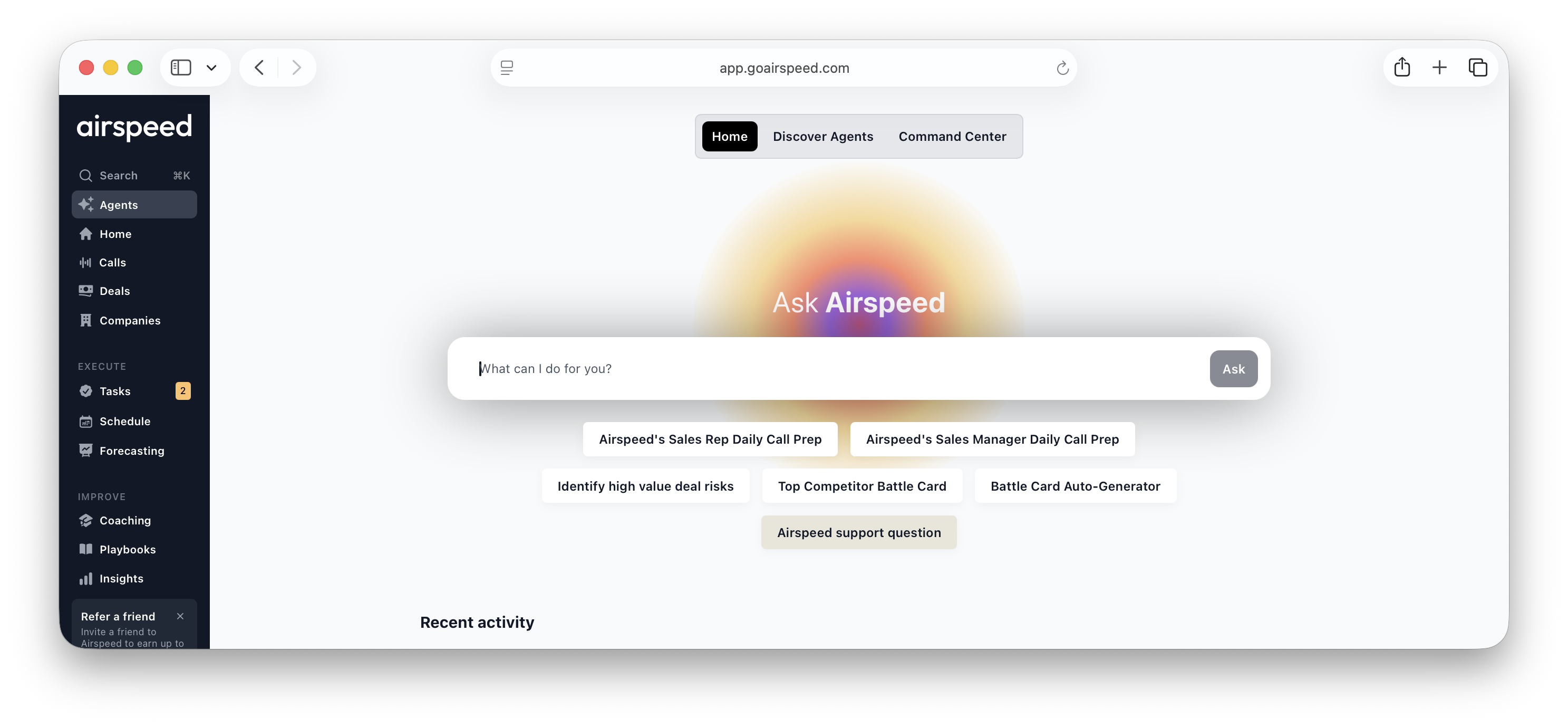
Open Agents from the left navigation. The Agents area has three main tabs:
Home — the collaboration space for asking Airspeed a one-time question and seeing recent agent activity.
Discover Agents — the template library, grouped by use case. Start here when you want an example to customize.
Command Center — your operational view of live agents, on-demand agents, and suggested agents.
What data can Agents use?
Agents can use the data Airspeed has access to for your workspace and for the user who owns or runs the agent. Depending on your setup, this can include call transcripts, call metadata, CRM fields, deal stages, deal amounts, company history, custom insights, qualification annotations, product and organizational memory, and external web search when enabled.
Agents respect Airspeed permissions and data access. If a user cannot view certain calls or accounts, their agents should not use that restricted data.
Core concepts
Template — a prebuilt or shared agent definition you can run or customize.
Agent — your saved copy of a workflow, with its prompt, trigger, output, and history.
Live agent — an agent with an automatic trigger.
On-demand agent — a saved agent that runs manually.
Variables — placeholders such as
{{deal_id}}or{{call_title}}that insert trigger-specific context into a prompt.Connections — read-only external tools, such as Notion, Pylon, or PostHog, that Agents can search when connected.
Recommended reading order
:page_facing_up: Creating and managing Airspeed Agents
:page_facing_up: Using variables in Airspeed Agents
:page_facing_up: Using Scheduled Agents
:page_facing_up: Using Deal Stage Change Agents
:page_facing_up: Using After Call Agents
:page_facing_up: Using Web Triggers with Airspeed Agents
:page_facing_up: Managing Agents as an admin
:page_facing_up: Agent Connections
:page_facing_up: Agent sharing, history, and collaboration
:page_facing_up: Troubleshooting Airspeed Agents
FAQ
Why do I not see the Ask Airspeed bar on Agents pages?
The Agents area has its own chat and workflow surfaces, so the floating Ask Airspeed bar is hidden there.
Can Agents update my CRM or connected tools?
Agent capabilities depend on your workspace setup. Agent Connections are read-only: Agents can search and read connected tools, but they cannot create, update, or delete data through those connections.
Can I use Agents on mobile?
Agents are designed for the desktop web app. Some related Ask Airspeed surfaces may not appear on mobile.