Coaching
Last updated: May 20, 2026
The Coaching section in Airspeed helps managers and reps improve sales performance through post-call scoring, team-wide performance tracking, and AI-powered training simulations. It is available from the Coaching link in the left navigation.
Scorecards
Scorecards automatically evaluate every call against a set of skills you define — such as discovery, objection handling, or product knowledge. After each call, Airspeed scores each skill, provides a written explanation, and cites the relevant moments in the transcript.
The Scorecards view shows:
Team view — average scores across the team over time, with trends for each skill.
Individual view — click any team member to see their scorecard history, skill radar chart, and improvement suggestions.
Scorecards are created and managed at Settings > Coaching. You can build from scratch or start from a default template, and filter scorecards by call tag and user.
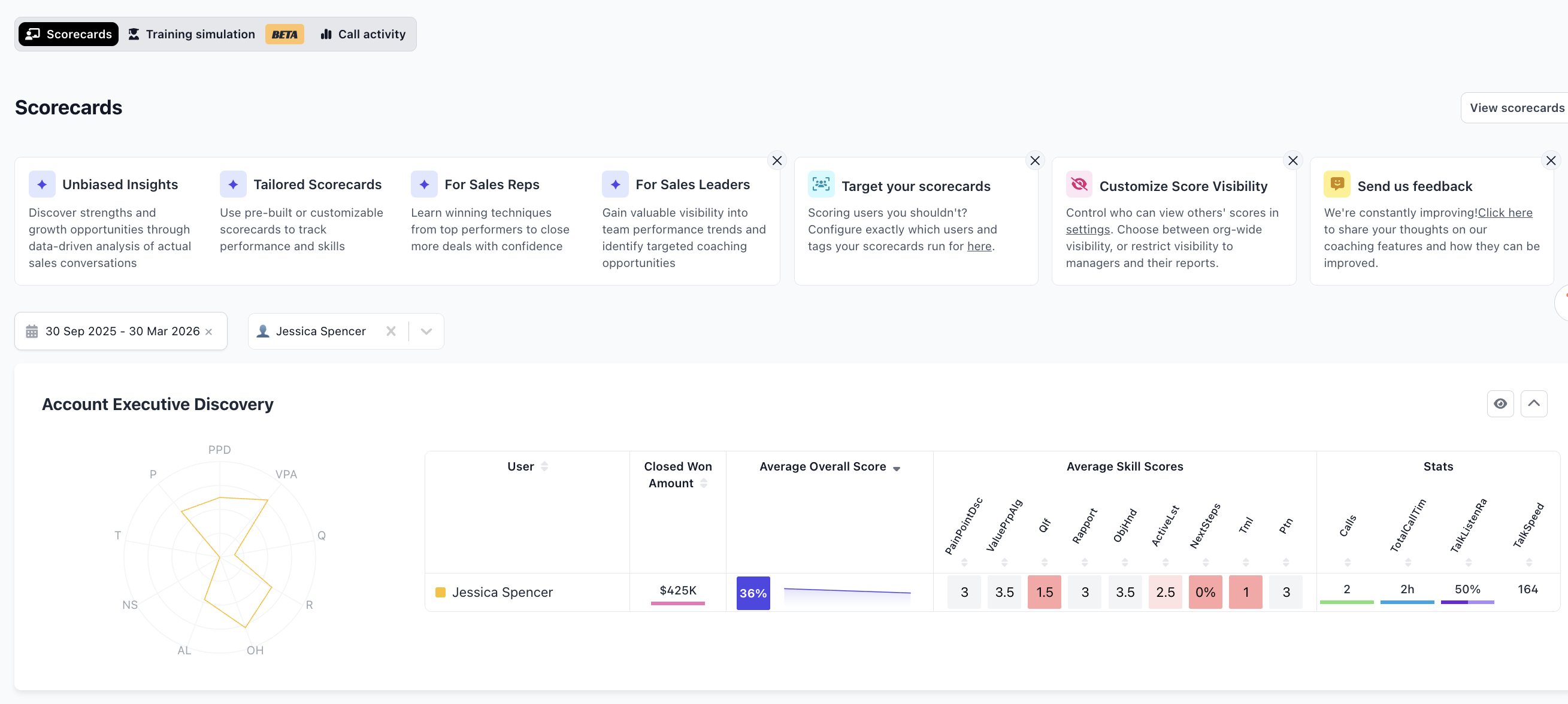
Scorecards give every call a structured evaluation across the skills that matter to your team.
Training Simulation
Training Simulation (currently in beta) lets reps practise sales conversations in a safe environment. Choose a scenario, receive a briefing, and work through an AI-simulated conversation. Completed training sessions are recorded and can be reviewed like any other call.
Managers can create custom training scenarios and certifications to target specific skills or situations.
Call Activity
The Call Activity tab shows aggregate talk metrics across the team — number of calls, total call time, talk-to-listen ratio, and talk speed — filterable by date range and team member. See the Stats article for full details.

The Coaching section has three areas: Scorecards, Training Simulation, and Call Activity.
For more detail on each area, see the dedicated articles: Post-call coaching, Deal Coaching, and Stats.